


About Folgo
Folgo is a Google Workspace add-on designed to help users and administrators manage Google Drive content more efficiently. With Folgo, you can run large-scale actions from Google Drive or Google Sheets. Folgo works directly with your Google account and only uses the permissions required to provide the features you choose to run.
This add-on is tightly integrated with your Google account and the data stored in said account. Add-ons are created and powered by Google Apps Script, on Google servers. Information gathered will never be sold or shared to external people. When we need to store data outside of your Google account, we use a Google service for that: Firebase. Your data never leaves Google servers. We are only storing data in Firebase when needed to provide the service offered by the add-on. Most data collected by our add-ons are directly processed within Google Apps Script and are not saved in any database for later reuse.
Our App's use of information received, and App's transfer of information to any other app received from Google APIs will adhere to Google API User Data Policy, including the Limited Use Requirements.
Acceptance of this policy
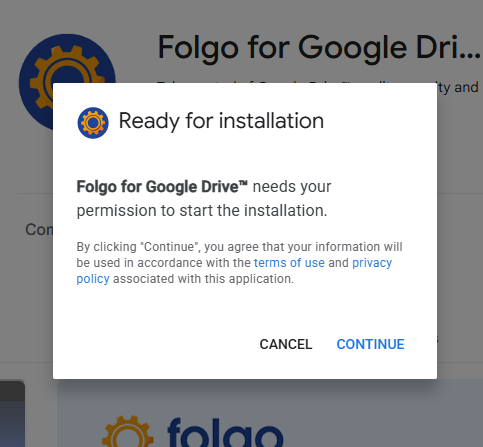
Folgo can only be installed from the Google Workspace Marketplace and when installing, Google will prompt you to accept this policy: “By clicking Continue, you acknowledge that your information will be used in accordance with the terms of service and privacy policy of this application.”
Data Classification
Depending on its security impact, data is classified according to the five following categories:
- Confidential data has the highest level of security. Only the user has access to it. To copy files and folders, Folgo requires full access to your Google Drive, but the content of all files from your Google Drive are strictly confidential and Folgo never reads that content.
- Sensitive data is needed for Folgo to perform the service you are requesting from the add-on, and is never shared out of this scope. All sensitive data such as files and folders to copy or transfer, the copies generated by Folgo, the email addresses used to transfer ownership, and all metadata of your files and folders (titles, ids, urls, types, locations, paths, owners, editors, commenters, viewers, shared outsides, creation dates, last modifying dates, last update dates) remain under your control within your Google account.
- Shareable data can be shared to specific people within the company. For example, the Folgo Support Team may ask users to share their Google Sheets reports for troubleshooting purposes. We will never keep a copy of your Drive documents' data and we strongly encourage you to remove us access to your files once your request has been addressed and resolved.
- Public data can be shared as public records, like all the content published in this Folgo's website.
- Private data belongs to individuals who are responsible for the maintenance and backup.
Uninstalling Folgo will interrupt all the add-on's functionality and activities on your Google account.
However, there is no automatic deletion of your user data in our database (Firebase). To get your data from Firebase deleted, please send your request to support@folgo.app and we will proceed to the deletion within 30 days.
Data Access
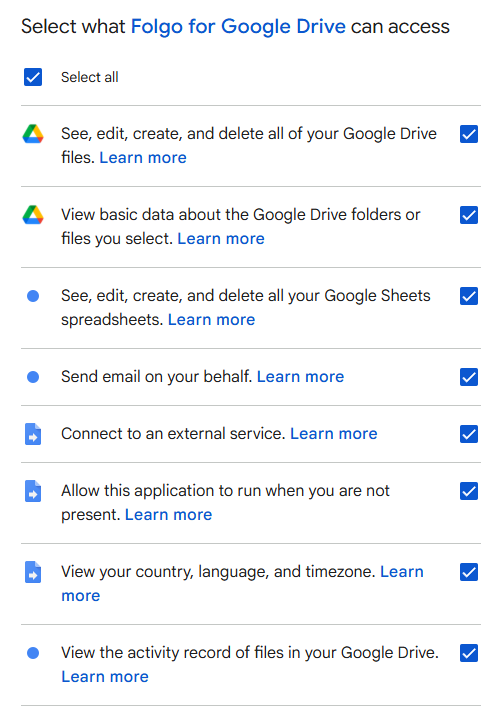
When you install Folgo on your Google account, You will be prompted to authorize different accesses. To function properly, Folgo requires all requested permissions to be granted. Those authorizations will only be used to perform the service you are requesting from the add-on you have installed. We only request the bare minimum permissions, Folgo does not ask for unrestricted access to your entire Google Drive, access to personal files, or access to any data unrelated to its features. If a permission is not essential, we do not ask for it.
Why does Folgo need access to those scopes?
- See, edit, create, and delete all your Google Drive files. This permission is needed because Folgo does not store any information about your files outside your Google Drive. It is needed to:
- create temporary files used to store metadata required for Folgo to operate,
- automatically clean up these temporary files once a job is completed,
- and for some Folgo features : move the files, update their permissions, transfer their ownership...
- let you select the specific folders you want to work on,
- access basic metadata required to configure and run your jobs.
- create Folgo report spreadsheets,
- append data for each completed job,
- update existing reports automatically.
- notify you when your jobs are completed,
- alert you if an error occurs during a job,
- when migrating content to a Shared Drive, contact file owners to request their approval to move files.
- Firebase (for authentication),
- Google App Engine.
- automatically resume interrupted jobs,
- safely execute long-running or large-scale operations,
- avoid requiring manual intervention.
- adapt the Folgo user interface to your language,
- display dates and times correctly based on your timezone.
- file activity history,
- recent actions performed on the analyzed files.
Data Storage
Data we store:
- Your Google account, to identify you as a Folgo user
- Your setup and options saved in the Folgo sidebar.
Data we do NOT store:
- Any information regarding your folders structure
- Your Google Drive files
- The reports with your folders content
Retention Time
We only retain collected information for as long as necessary to provide you with your requested service. What data we store, we’ll protect within commercially acceptable means to prevent loss and theft, as well as unauthorized access, disclosure, copying, use or modification.
User Account Deletion
If you wish to stop using our service, simply follow the steps below to uninstall Folgo from your Google account:
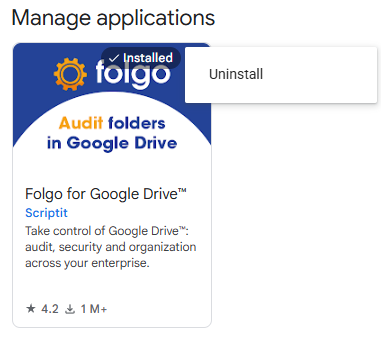
- Go to the Google Workspace Marketplace Manage applications page.
- Next to Folgo, click the three-dot menu.
- From the drop down menu, click "Uninstall".
Uninstalling Folgo will interrupt all the add-on's functionality and activities on your Google account. However, there is no automatic deletion of your user data in our database (Firebase). To get your data from Firebase deleted, please send your request to support@folgo.app and we will proceed to the deletion within 30 days.
Changes To This Privacy Policy
We may update our Privacy Policy from time to time. Thus, you are advised to review this Privacy Policy is subject to occasional revision, and we reserve the right to modify this Privacy Policy relating to Folgo at any time, effective upon posting of an updated version of this Privacy Policy.
When we do, we will revise the updated date at the top of this page periodically for any changes. We will notify you of any changes by posting the new Privacy Policy on this page and make available on the same website an archived version of the Privacy Policy before its revision: https://www.folgo.app/privacy-policy/archives. Continued use of Folgo after any such changes shall constitute your consent to such changes.
If your business or legal entity needs to be explicitly notified in case of changes to the terms, you may send an email to support@folgo.app to be added to our notification list.
