


Google Update
Google has recently introduced a significant improvement to how app permissions are presented when users connect third-party tools to their Google accounts. This change gives users more control over what they share, and aims to make consent much clearer and safer.
In this article, we break down what exactly changed, why it matters, and how it affects the way you grant access to apps like Google Workspace add-ons, scripts, or automation tools.
What Changed?
Before
Historically, Google’s OAuth consent screen required users to approve all requested access scopes in one go. If an app asked for multiple permissions, you had to accept every request even if you intended to use only one part.
After
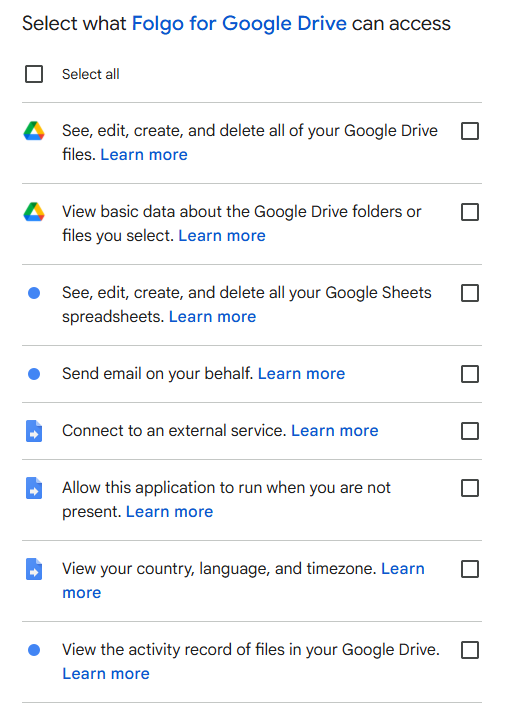
In November 2025, Google announced a significant change to its OAuth consent experience for web apps and Workspace add-ons, introducing a more granular permission approval flow. Instead of requiring users to grant all requested permissions at once, this new experience lets users choose exactly which specific permissions (scopes) they want to allow when connecting an app. In simple terms, Google has made the permission approval process more explicit and user-controlled.
For more details, you can also read the official article from Google.
What You’ll See Now When Granting Permissions
Now, you’ll see checkboxes/toggles for individual permissions. This lets you pick and choose what to allow based on your needs. For example, if an app needs access to Drive metadata but also requests broader access to files, you might choose to grant only metadata access. This helps keep your personal or corporate data more secure. This approach aligns with developers’ best practices of requesting the minimum necessary permissions for a tool’s functionality.
Why Did Google Make This Change?
This update is part of Google’s effort to strengthen user privacy and security across its ecosystem. Apps that connect to Google accounts can sometimes request powerful permissions, especially when they integrate with Drive, Gmail, Sheets, or Calendar. While many apps use these permissions responsibly, others may request unnecessary access or create confusion for users.
By improving how permissions are reviewed, Google aims to:
- Increase transparency by showing more clearly what an app can access,
- Give users more control over what they approve and share,
- Reduce risk by making unnecessary permissions easier to spot,
- Improve safety by avoiding an all-or-nothing consent experience.
This change improves privacy, transparency, and user control over their own data. It helps users make more informed decisions when connecting tools to their accounts.
Tips for Evaluating App Permissions
When granting access to any application, whether a Google Workspace add-on or a third-party integration, consider:
- Does the permission match the app’s purpose? If not, proceed with caution.
- Is the app reputable? Trusted apps usually explain why each permission is needed.
- Can you grant partial access? If granular options are available, choose only what’s necessary.
By taking a moment to review permissions, you improve your security and privacy. If you’re using tools that connect to Google Workspace, these tips make it easier to evaluate what access they need and why.
Folgo is one example of a tool built with transparency in mind, and we explain exactly how each permission is used in our Help Center article: Is Folgo Safe? Understanding Its Permissions.